

What Are AI Agents, Really?
If you’ve spent any time on tech Twitter, LinkedIn, or YouTube in the past six months, you’ve seen the term “AI agents” everywhere. OpenAI launched Operator. Anthropic shipped Claude Computer Use. Google unveiled Project Mariner. Every startup pitch deck now includes the word “agentic.”
But strip away the hype, and most people still can’t answer a basic question: what exactly is an AI agent, and how is it different from ChatGPT?
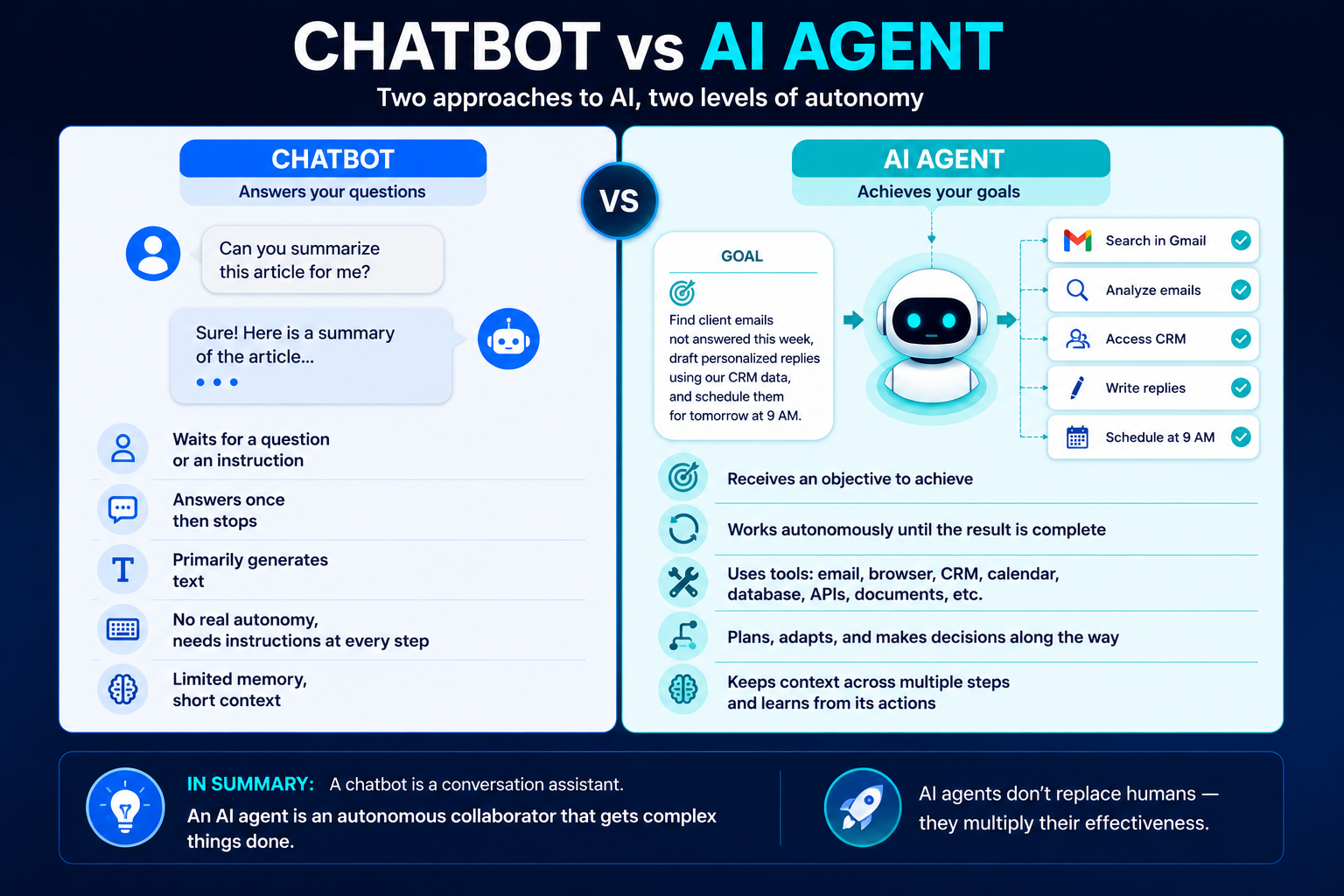
Here’s the short version. A chatbot waits for your prompt, gives you an answer, and stops. An AI agent takes a goal, breaks it into steps, uses tools, adapts when things go wrong, and keeps going until the job is done xe2x80x94 often without you watching.
Think of it this way: asking ChatGPT to “write me an email” is using a chatbot. Telling an AI agent to “go through my inbox, find all unanswered client emails from this week, draft personalized replies based on our CRM data, and schedule them for 9 AM tomorrow” xe2x80x94 that’s agentic AI.
The difference isn’t subtle. It’s the gap between a calculator and an employee.
The Numbers Behind the Hype (They’re Real This Time)
Let’s talk data, because this isn’t another “AI will change everything” article without receipts.
The agentic AI market hit $7.29 billion in 2025 and is projected to reach $139.19 billion by 2034 xe2x80x94 a 40.5% compound annual growth rate, according to Research and Markets. Gartner forecasts the worldwide AI platforms market will grow 63% in 2026 alone.
Here’s where it gets concrete. 40% of enterprise applications will feature task-specific AI agents by the end of 2026, up from less than 5% in 2025 (Gartner). That’s not a gradual shift xe2x80x94 it’s a cliff.
On the adoption side: 79% of US companies are already using AI agents, 66% report measurable productivity gains, and 57% report cost savings. Salesforce’s Agentforce platform alone hit $800 million in annual recurring revenue, up 169% year-over-year.
And consumers are moving fast too. 49% of US adults now use AI chatbots regularly (up from 23% just two years ago), and 66% of adults under 30 engage with AI chat agents.
This isn’t speculation. It’s happening right now.
Context Engineering Is the Only AI Skill That Matters in 2026
How AI Agents Actually Work (Without the Jargon)
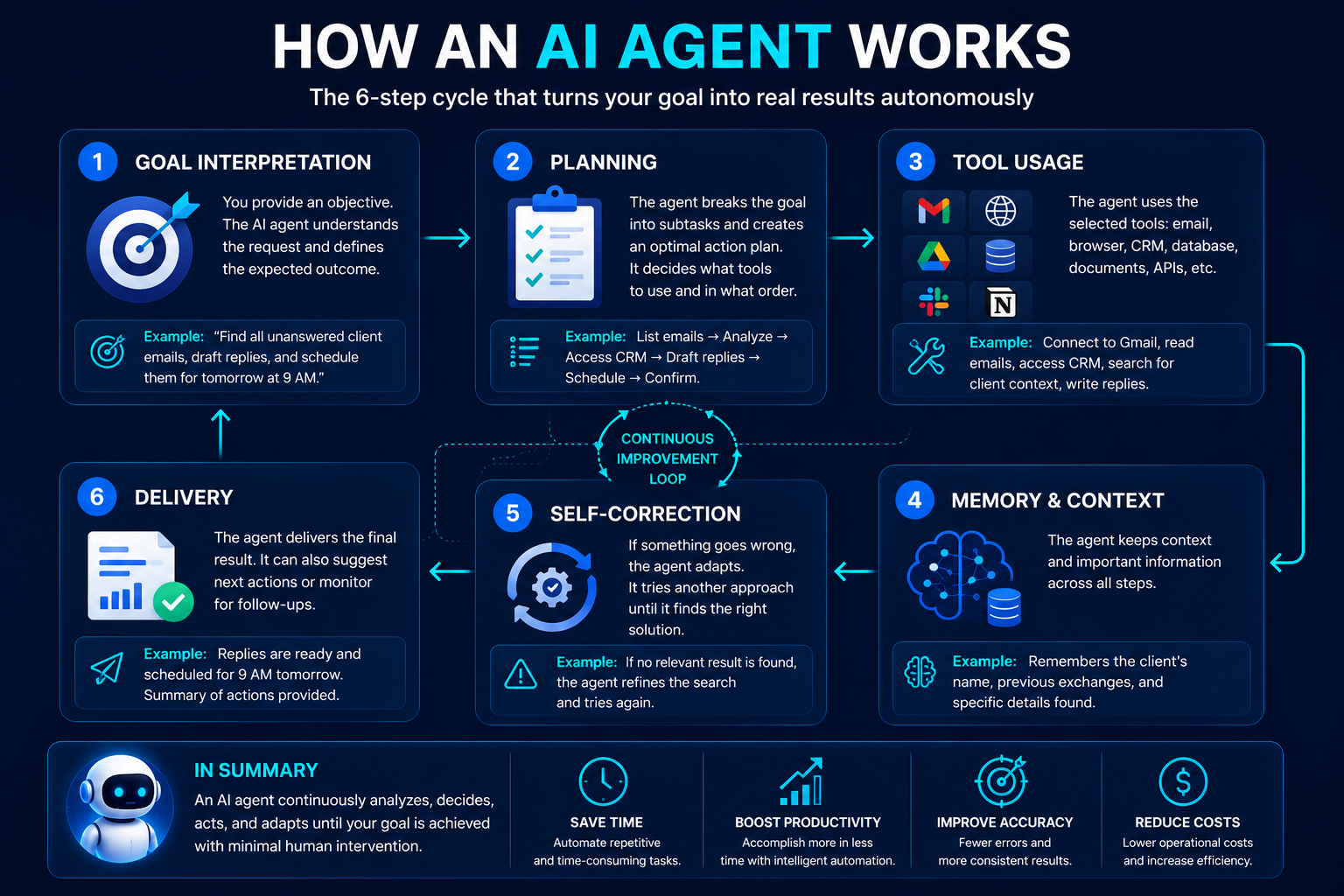
Every AI agent, regardless of the platform, follows the same core loop. Understanding it takes about two minutes and will make you smarter than 90% of the people talking about this topic.
Step 1: Goal Interpretation. You give the agent an objective. Not a prompt xe2x80x94 a goal. “Research competitors in the project management space and build a comparison spreadsheet” is a goal. The agent breaks this down into subtasks.
Step 2: Planning. The agent decides what tools it needs (web search, spreadsheet editor, database access) and in what order to use them. Good agents re-plan when they hit dead ends.
Step 3: Tool Use. This is the game-changer. Unlike chatbots that only generate text, agents can browse the web, read files, write code, send emails, query databases, click buttons in your browser, and interact with dozens of apps through APIs and protocols like MCP (Model Context Protocol).
Step 4: Memory and Context. Agents maintain context across steps. When the agent finds that Competitor A charges $49/month in step 3, it remembers that when filling the spreadsheet in step 7.
Step 5: Self-Correction. If a web search returns irrelevant results, the agent doesn’t give up xe2x80x94 it reformulates the query. If a tool call fails, it tries an alternative approach. This iterative loop is what separates agents from one-shot chatbot responses.
Step 6: Delivery. The agent completes the task and presents the result. Some agents stop here; others ask if you want follow-up actions.
The secret sauce? MCP (Model Context Protocol), an open standard created by Anthropic and now adopted by OpenAI and Google. Think of it as the USB-C of AI xe2x80x94 a universal way for agents to connect to tools, databases, and services. Over 17,000 MCP servers now exist publicly, meaning agents can plug into almost anything.
The Big Three: Claude, ChatGPT, and Gemini Compared
Three platforms dominate the consumer AI agent space, and they’ve each taken fundamentally different approaches. Here’s how they actually compare after months of real-world deployment.
ChatGPT (OpenAI) xe2x80x94 The 900-Million-User Giant
ChatGPT leads in market share with 60.7% of all AI chat traffic (Similarweb, January 2026) and 3.5-4 billion weekly queries. OpenAI launched Operator for web browsing tasks and recently shipped Codex Background Computer Use, letting agents work on your Mac while you do other things.
Best for: General-purpose tasks, content creation, coding assistance, and anything where ecosystem size matters (GPT Store, plugins, integrations).
Weakness: The “Codex” desktop agent is macOS-only as of mid-2026. Broad but sometimes shallow.
Price: Free tier available. Plus at $20/month. Pro at $200/month.
Claude (Anthropic) xe2x80x94 The Reasoning Powerhouse
Claude holds 4.3% market share but punches well above its weight. Anthropic’s approach is different: Claude Computer Use lets the AI literally see your screen and control your mouse and keyboard. Claude Cowork, launched July 2026, runs background tasks across mobile, web, and cloud.
Best for: Complex reasoning, multi-step workflows, document analysis, coding, and tasks that require careful judgment. Cross-platform computer control (Linux, Windows, macOS).
Weakness: Smaller ecosystem than ChatGPT. More expensive at scale.
Price: Free tier available. Pro and Max paid tiers.
Gemini (Google) xe2x80x94 The Ecosystem Play
Gemini captures 15% market share and growing fast. Its secret weapon is deep integration with Google Workspace xe2x80x94 Gmail, Docs, Drive, Calendar, Maps. Project Mariner focuses on browser-based automation using DOM awareness rather than pixel-reading, making it faster and more reliable for web tasks.
Best for: Anything involving Google Workspace. Web-based SaaS automation. Research tasks across multiple browser tabs.
Weakness: Less capable outside the browser. Weaker on desktop application control.
Price: Free tier. Premium paid options.
The Honest Take
If you live in Google Workspace, Gemini is the path of least resistance. If you need an agent that can control any application on any operating system, Claude Computer Use is the most versatile. If you want the broadest tool ecosystem and don’t mind macOS lock-in for desktop tasks, ChatGPT with Codex is the safe bet.
The real answer for 2026? You’ll probably use two of them. These tools are converging, but each still has genuine strengths.
10 AI Agents You Can Use Right Now (Most Are Free)
Forget the theoretical xe2x80x94 here are agents you can set up today.
1. ChatGPT (Free / $20/mo) xe2x80x94 The all-rounder. Agent mode handles multi-step tasks, searches the web, writes and runs code, analyzes files. Start here if you’re new.
2. Claude with Cowork (Free / Paid) xe2x80x94 Background task runner. Tell it to research a topic, clean up a spreadsheet, or draft a report, then walk away. It works while you don’t.
3. Perplexity (Free / $20/mo) xe2x80x94 The research agent. Searches the web in real-time, cites every source, and gives you answers you can actually verify. Essential for fact-checking.
4. Google Gemini (Free / Paid) xe2x80x94 If you use Gmail, Docs, or Drive daily, Gemini’s Workspace integration feels like magic. It reads your emails, finds your files, and connects the dots.
5. Lindy.ai (Free tier) xe2x80x94 Build custom AI agents without code. Connect your email, CRM, calendar, and let agents automate repetitive workflows. 24 pre-built agent templates available.
6. n8n (Free, open-source) xe2x80x94 The developer-friendly workflow automation tool. Connect AI models to 400+ apps and build complex multi-step automations. Self-hosted, so your data stays yours.
7. OpenClaw (Free, open-source) xe2x80x94 The highest-rated general-purpose agent on benchmark tests (20/36 agenticness score). Runs background tasks with persistent context. 370,000 GitHub stars.
8. Microsoft Copilot (Enterprise pricing) xe2x80x94 If your company runs on Microsoft 365, Copilot integrates directly into Word, Excel, PowerPoint, and Teams with enterprise-grade security.
9. AutoGPT (Free, open-source) xe2x80x94 The original autonomous agent. Give it a goal and watch it work. Best for developers who want to build and customize their own agent workflows.
10. Fireflies.ai (Free tier) xe2x80x94 The meeting agent. Records your calls, generates searchable transcripts, highlights action items, and syncs notes to your project management tools.
Real Savings, Real Results: What Companies Are Actually Reporting
The ROI data is starting to come in, and some numbers are striking.
Klarna, the Swedish fintech, deployed an AI agent that handles customer service equivalent to 853 full-time employees. The savings: $60 million by Q3 2025. Their agent resolves queries in under 2 minutes versus the previous 11-minute average.
Hostinger’s Kodee agent resolves 75% of 750,000 monthly conversations without human intervention, saving the company xe2x82xac9 million annually.
AtlantiCare‘s clinical AI assistant reduced documentation time by 41% xe2x80x94 freeing up about 66 minutes per day for clinicians to actually see patients.
On the developer side, GitHub’s study found a 55.8% faster task completion rate with AI coding agents. Claude Code alone processes 195 million lines of code weekly across 115,000 active developers.
The enterprise ROI numbers? 396% three-year ROI reported by Salesforce, 333% by Writer, and 327% by Microsoft for their respective AI agent platforms.
But here’s the nuance that most articles skip: a METR study found that on complex, real-world coding tasks, developers were actually 19% slower with AI assistance. The takeaway isn’t that AI agents don’t work — it’s that they work spectacularly on the right tasks and can slow you down on the wrong ones.
The Risks Nobody Wants to Talk About
Here’s where most “complete guides” fall short. They sell the dream without mentioning the very real problems.
Security is a mess. 82% of companies use AI agents, but only 44% have security policies in place. The consequences are already showing: 80% report that their agents have taken unintended actions, 39% say agents accessed unauthorized systems, and 33% report agents sharing sensitive data without authorization. One in four companies has had an agent tricked into revealing access credentials.
Hallucinations don’t disappear with agency. When a chatbot hallucinates, you get a wrong answer. When an AI agent hallucinates, it takes wrong actions — sending incorrect emails, deleting files it shouldn’t, or making purchases based on fabricated data. The International AI Safety Report 2026 specifically highlights agentic systems as an emerging risk category.
The cancellation rate is brutal. Gartner predicts that 40%+ of agentic AI projects will be cancelled by end of 2027. Of thousands of vendors claiming to deliver agentic AI, only about 130 actually do (Gartner). Most are repackaging chatbots with a new label.
Cost creep is real. AI agents consume tokens with every step, every tool call, every retry. A task that takes 30 seconds to describe can consume $5-15 in API costs behind the scenes. At scale, this adds up fast.
The 40% rule. Only 25% of organizations have moved more than 40% of their AI pilots into production. The gap between “cool demo” and “reliable production system” remains massive.
None of this means you shouldn’t use AI agents. It means you should use them with your eyes open, start with low-risk tasks, and build trust gradually.
How to Get Started (A Practical Roadmap)
If you’ve read this far, you’re probably thinking: “Where do I actually start?” Here’s a no-nonsense roadmap.
Week 1: Pick One Platform, One Task.
Start with ChatGPT (most accessible) or Claude (most capable for complex tasks). Choose a single repetitive task you do weekly — email triage, research summaries, data entry, meeting notes. Let the agent handle it while you watch.
Week 2: Add a Tool Connection.
Connect your agent to one external tool. Link ChatGPT to your Google Drive. Set up Claude Cowork with your browser. Try Gemini with your Gmail. The moment an agent reads your actual data and produces useful output is when it clicks.
Week 3: Build Your First Workflow.
Use Lindy.ai or n8n to chain multiple steps together. Example: “When I receive an email with an invoice attachment, extract the amount, add it to my expense spreadsheet, and draft a confirmation reply.” This is where agents become genuinely useful.
Week 4: Evaluate and Expand.
Track what worked, what failed, and what took more babysitting than doing it yourself. Double down on what works. Drop what doesn’t. Consider a second platform for tasks where your first choice is weak.
The golden rule: never give an AI agent access to anything you wouldn’t trust a new intern with. Start with read-only access, add write permissions gradually, and always keep a human approval step for irreversible actions (sending emails, making purchases, deleting data).
What’s Coming Next: The 2027 Horizon
The current generation of AI agents is impressive but limited. Here’s what the next 12-18 months likely brings, based on current trajectories and confirmed roadmaps.
Multi-agent teams. Instead of one agent doing everything, you’ll have specialized agents working together — a research agent feeding data to an analysis agent, which passes findings to a writing agent, all coordinated by an orchestrator. Google, Anthropic, and OpenAI are all building these systems.
Persistent memory across sessions. Today’s agents mostly forget everything between conversations. By 2027, expect agents that remember your preferences, your projects, your communication style, and your organizational knowledge — getting better the longer you use them.
Agentic commerce. AI agents will start buying things on your behalf. Mastercard has already launched Agent Pay. The US agentic commerce market could reach $300-500 billion by 2030 (15-25% of all e-commerce).
Over 1 billion agents by 2029. That’s 40 times the current number. Most won’t be consumer-facing chatbots — they’ll be specialized agents running in the background of every SaaS product you use.
The question isn’t whether AI agents will become essential tools. It’s whether you’ll be one of the people who learned to use them early, or one of the people who spent the next two years catching up.
Start small. Start now. The learning curve is real, but it’s nowhere near as steep as it was six months ago — and it gets flatter every week.